Uncategorized

Tips for spamming emails

Tips for spamming emails 
All emails leads have a robot that detects a link which they\’re gonna check the source of the link to know the content of it.
This is why you send letter without link and it comes inbox and when you send with your spamming link it goes to junk.
When a robot detects your link then your scama will be down because they will report to your host to turn off your service because you\’re phishing.
Two type of detection in scama… 
1) detected from host 
2) detected from email 
When a scama is detected by host it means that the scam dosen\’t have a good antibots which means the providers will know that a malicious zip file or folder have been uploaded on there server…..it also affect link and you will see something like suspended when you try to load your shell or cpanel.
Detected from email is when robot detects your link and send report to your host that you are phishing…….They will also blacklist your link and block any link From your panel or shell from coming inbox. 
How to avoid 
Use clean scama with anti bots
First prevention from host
Use encrypted letter and link to redirect and make scama green always…… 
Protect your link……
Uncategorized

Samsung Galaxy M01 with Android 10 certified by the Wi-Fi Alliance

Samsung Galaxy M01 with Android 10 certified by the Wi-Fi Alliance
A couple of weeks back, SamMobile reported about a Galaxy M01 device. More recently, this unannounced Galaxy M01 device has been certified by the Wi-Fi Alliance with support for Wi-Fi b/g/n. No other details about the Galaxy M01 are known, but the recent Wi-Fi Alliance certification suggests its launch should be imminent.
Uncategorized

HOW TO USE AN EMAIL ADDRESS MULTIPLE TIMES ON A WEBSITE.

HOW TO USE AN EMAIL ADDRESS MULTIPLE TIMES ON A WEBSITE. 
Hello, I believe You are Reading This Email Article either Because
You need help either in Using Your Email Address Multiple Times On a Website or
Creating a Gmail without OTP.
To Use an Email or Gmail Address Multiple Times all You need to do is to add a dot in between the mail address name. For example add a dot in between any where in the email address.
Let’s Me Explain, for Better understanding…
 I will be using this email address
LEARNHACKINN@gmail.com 
as example.
For example you registered
LEARNHACKINN@gmail.com 
on Netflix and You want to create another account on NETFLIX again using the same address u Just add a dot Like this,
L.EARNHACKINN@gmail.com 
and You will see it will be accepted.
What will happen to messages sent to the custom email address?
Don’t panic About your messages because all Your Messages sent  will be received on your main inbox.
That is all Messages sent to
 L.EARNHACKINN@gmail.com 
will be Automatically forwarded to
 LEARNHACKINN@gmail.com 
but it may take a little while like 1 – 3 minutes.
That\’s all.
I hope you guys like this tutorial.
Thanks for reading have a nice day. 😉
Uncategorized

Huawei P40 Lineup Uses BOE Screens

Huawei P40 lineup uses BOE screens
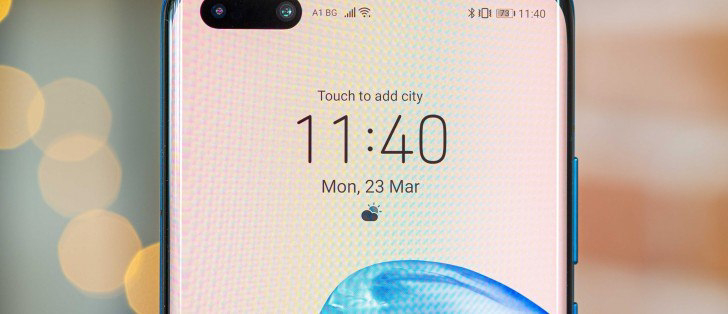
The Huawei P40 family debuted yesterday with two different displays – vanilla P40 with a flat 6.1\” OLED of FullHD resolution, and quad-curved 90Hz 6.6\” OLED for the P40 Pro and P40 Pro wioth 1200x2640px resolution. Huawei P40 Pro Huawei P40 BOE was really proud of its accomplishment with the curved panels of the P40 Pro and P40 Pro that also have a depth/biometric sensor tucked in the punch hole. The basic P40 has two cameras and this was more of a two-punch-hole solution.
Uncategorized

Huawei P40 Pro Review

Huawei P40 Pro review
Score:- 4.4
Body: Glass front and back, aluminum frame; IP68-rated for dust and water resistance.
Screen: 6.58\” quad-curved OLED, 1,200×2,640px resolution (440ppi); HDR10.
Chipset: Kirin 990 5G, octa-core processor (2xA76 @2.86GHz + 2xA76 @2.36GHz +4xA55 @1.95GHz), Mali-G76 MP16 GPU, dual-core NPU.
Memory: 8GB RAM, 256GB UFS3.0 storage (expandable via Nano Memory – hybrid slot).
OS/Software: Android 10, EMUI 10.1.
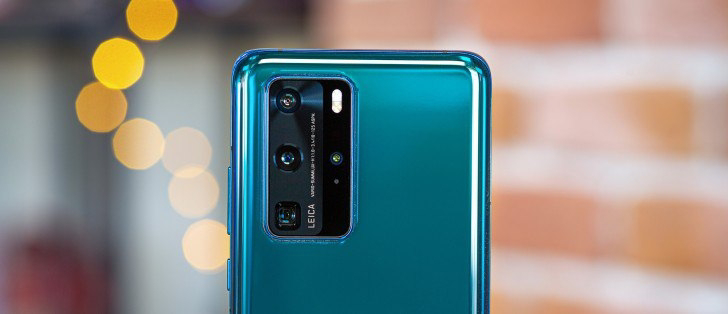
Rear camera: Primary: 50MP (RYYB filter), 1/1.28\” sensor size, 23mm f/1.8 lens, OIS, PDAF; Telephoto: 8MP (RYYB filter) 1/4.0\” with periscope 125mm f/3.4 OIS lens, 5x optical and 10x hybrid zoom, PDAF; Ultra wide angle: 40MP (RGGB filter), 1/1.54\”, 18mm, f/1.8, PDAF; ToF camera; 4K@60fps video capture, 720@7680fps slow-mo; Leica co-developed.
Front camera: 32MP, f/2.2, 26mm; ToF camera.
Battery: 4,200mAh; Super Charge 40W; 27W wireless charging; 27W reverse wireless charging.
Security: Fingerprint reader (under display, optical), 3D face recognition.
Connectivity: 5G/4G/3G/GSM; Dual SIM, Wi-Fi 6+, Dual-band GPS, Bluetooth 5.1 + LE, NFC, USB Type-C.
Misc: IR blaster, acoustic display acts as earpiece, bottom-firing loudspeaker.
 
Uncategorized

HOW TO BYPASS SOFTWARE REGISTRATIONS

 HOW TO BYPASS SOFTWARE REGISTRATIONS 
( I mean bypass softwares which ask keys to register or premium upgrade)
➖➖➖➖➖➖➖➖➖➖➖
REQUIREMENTS
Windows (for examples only, debuggers exist across platforms)
 A debugger installed: IDA, ollydbg, etc.
STEPS
Step 1 Test the Program
First, run the program that you are attempting to reverse engineer and try to activate it with a random key to verify that you need a valid software key to proceed. This is to verify that we can come up with the keys.
 Step 2 Run the Program in a Debugger
Run ollydbg.
Open up the program you wish to bypass with ollydbg.
Click the play button to run the program with the debugger attached.
Right click the CPU window, and click Search For > All intermodular calls.
Search for high interest DLLs. GETDLGITEMTEXT, will be for dialog boxes, which get called when you try to enter a software key.
By stepping into the function with the debugger, we can examine the registration specifically. 
SENDDLGITEM could be used as well.
Test to see which one works to break out of the activation loop by right clicking the DLL call and setting a breakpoint for all instances of that call.
Resume the program and enter any software key you feel like. 
 If the debugger breaks (pauses the program\’s execution) after entering your key, then you know you found DLL in step 5.
Press F8 back in the CPU window to force the next step until you get to the TEST EAX. EAX is the return of a value, which means that a check is being performed here. 
Upon examination, we can see that the EAX is checking for a number that is not equal to a null value. This means that if it is replaced with anything other than null, it will run.
Right-click the EAX and change it in hex value to 1, instead of 0.
 Resume the program again, and you will have successfully activated the program.
This works because you are making the process jump from one register and skip the one that verifies the key entered. 
I hope you all understand this.. I will try to make a video for this and upload to our YouTube channel Raylessbloggers
I\’m sorry for not posting continuously bcoz I\’m busy with my clg.. I will try my best to post ..please stay tuned
Uncategorized

How to enter your passcode on a cracked iPhone screen

 How to enter your passcode on a cracked iPhone screen

Hold down the Home button to activate Siri. Say Turn on VoiceOver
Press the Home button twice to bring up the passcode screen.
Use the portion of your screen that responds to touch to swipe left and right, which will move your VoiceOver cursor to different passcode number buttons. VoiceOver will also say the button being selected, which is helpful if you can\’t see the screen.
When the cursor is on the next passcode number you need, double tap to “tap” the selected passcode number.
After the iPhone unlocks, you may need VoiceOver one last time to tap “Trust” in the dialog that comes up when you plug in your iPhone to your computer.
Copy your photos and/or make your backup in iTunes!
To turn off VoiceOver, you can say “Turn off VoiceOver” to Siri, or go into Settings > General > Accessibility to turn it off manually.
Uncategorized

( MUST READ) Common Sense Security Strategies in the Digital World

You’ve been Hacked! Pwned! Account Compromised. Bank account emptied. Credit cards were stolen and sold on the dark web. Facebook account hacked, now inappropriate messages or videos sent to your friends and family members. New accounts and credit cards opened in your name. Or worse, you’re on a vacation and suddenly your credit card is declined or you’re in the airport and your flight is canceled. Maybe you’re traveling through an airport and someone skims your credit card and starts making transactions while you’re in the air. What would you do? How long would it take you to respond? How many times have you received a phone call that says you have to pay some portion of a bitcoin (BTC), or a webcam video of you doing something inappropriate is going to be sent to all your contacts. 
These are just a few of the scenarios that can and do happen in our increasingly connected world. With the Samsung Pay and Apple Pay, mobile payments that can be performed with your cell phone, Apple Watch, or Android Wear watch and the increasing number of Mobile devices and Internet of Things (IoT) devices security is paramount for everyone no matter what your career field or socioeconomic status. The purpose of this article is to give you some common sense tips to protect yourself and also give you the ability to help your friends and family stay safe online as well.
Part 1: Facebook:
As of the time of writing this article, Facebook has approximately 2.23 Billion users worldwide and that means that even if you are not on Facebook, many of your friends might be. So you don’t have a Facebook account you say so you’re not at risk? Well, that’s not exactly true because of a trend called cybersquatting…That means that someone can claim your Facebook name and effectively pose as you simply by creating an account in your name even if you don’t have a Facebook account. Or maybe you don’t check Facebook that often. It’s also plausible that someone might make a Facebook account that is similar to yours and people in your network or friends of your friends might send you a friend request thinking that it’s you. Additionally, you absolutely should go into your Facebook account and view your profile as someone else sees it to make sure you’re not sharing information with people you don’t want to. If you’ve seen the news recently, hackers were able to exploit a vulnerability in the supposedly secure tokens that allow you to view your profile as one of your friends.
Part 2: Passwords and Password vaults
There are three kinds of users in this world: 1. Those that use the same password for everything 2. Those that write their passwords down so they won’t forget, and 3. Those that use password vaults/generators. Passwords are the last line of defense when it comes to security and often the first thing that bad guys go after. Commonly referred to as creds, the usernames and passwords are what hackers seek to exfiltrate from the networks and systems they go after. Passwords should be changed at a minimum every 90 days and should be a complex pattern of letters, numbers, and special characters that are not easily guessed or cracked. No dictionary words allowed or any of the potential answers to your secret questions.
It doesn’t matter really the password service you use, just use one. Whether it’s LastPass, Dashlane, KeePass, or Apple’s built-in password manager. Every password in the wild is another chance for a bad guy to exploit.
Part 3: App downloads
Third party app stores are the primary way that ransomware and crypto miners are spread in the wild. Even Amazon’s own app store requires you to allow apps from unknown sources if you don’t have an Amazon-branded device. Bottom line, don’t use app stores you don’t know and us security software if possible (though that doesn’t provide much protection). Mobile apps are special in that each app runs code on a mobile device and can be reverse engineered/exploited by anyone with enough time and effort. Mobile apps are usually digitally signed by Apple and Google, but that is easily faked. Mobile apps live in an operating environment that is full of security vulnerabilities and exploits and many of them cannot be fixed because they are controlled by the carriers or equipment manufacturers. Carriers like T-Mobile, Verizon, AT&T and Sprint, many of which don’t have an interest in fixing the vulnerabilities because they are more interested in getting you to buy a new phone every year or every other year. Because data plans are at a premium, carriers can charge ridiculous amounts of money for data and wireless hotspot plans. With the introduction of 5G service, this will only amplify the speed at which attackers can serve up exploits to mobile users. Apple is notorious for convincing users to upgrade to new devices because of some new feature or operating system version and eventually, devices will no longer run the latest and greatest Operating System (anyone still remember the iPod touch?)
Uncategorized

How To Hack Android Games without rooting using Game Killer.

How To Hack Android Games without rooting using Game Killer.
Download Game KIller
#1. Download & Install Game Killer Apk 2019
#2. Tap the Game Killer icon and start up the app, give it a few seconds to fully load and the main menu should appear with a list of options, tap the first option which says “Hack Android Games Without Root” and another screen should pop up with a long list of supported games.
#3. Once you’ve found the Android game you want to hack, tap on it’s name and you’ll be taken to another screen with a list of hacks you can activate.
#4. This process depending on which game you’re hacking, there may be options such as unlimited gold, Hack unlimited gems, god mode, unlocking all characters and levels, etc.
#5. Select which hacks you’d like to use and press the back button on the bottom of the screen.
#6. Game Killer will launch a hacked instance of the game with your desired hacks, for most games you can log into the game normally and still have the items which you hacked, but some games require to be launched with Game Killer in order to keep the hacked items.
Wrap Up: So above is all two different methods to hack android games without root 2020. 
These methods are working and tested in 2020. All about how to hack android games no root. Game hackers, Game killer and without a rooting Android phone are in above.
Uncategorized

CC TO BTC METHOD

CC TO BTC METHOD
Need:-
1] CCs
2] ANON sim cards (1 per renter and 1 per customer)
3] Your computer
4] Photo Exif Editor Apps (Runs with Android free app)
5] Anon Offshore CC with IBAN attached (optional but very useful for quick big cashouts)
This method will allows you to cahsout all CCs to BTC easily with fake listings on 9flats.com. 9flats.com works in Europe and America, have no security (but it would be better if you use VPN, SOCKS5 etc..) no chargeback and bitcoins are accepted.
Steps:-
1] Open an account (renter) on 9flats with a fake e-mail address, during the first 3 days log-in your account and visit the website, take quick looks on the listings (act like a real renter ).
2] During these 3 days, you will need to pick up some pictures of flats for rent (the best way is groups on Facebook). Once you have your pictures, you will need to change the exif datas (use « Photo exif editor » for that), to the geolocation of your fake listing (use a real geolocation, google maps is your friend) and very important change also the info « photo taken the … » and chose a date during these 3 days (very good to increase your scoring) and don’t forget your pics in .jpg (important ! ! )
3] After these 3 days create your listing on 9flats, the best way is to make a good standing flat in a chic place (approx $150 – $200 per day). Be a comedian ! Put periods of unavailability to look like to a regular renter. After that you will need to wait 48h to 72h before your rental ad is online.
4] After 72h max your ad is online, good ! Log-in sometimes everyday (or every 2 days) during 1 week to look like as same as a normal renter.
5] 1 week after Day 1 open a customer account (name must be as same as cc holder of course), act like a real customer, take your time to visit ads near the area of your fake flat, ask questions to other renters (4 days), after the 4th day : Card your own ad and don’t forget to contact the fake renter (you ! ) before, ask some questions etc…
6] Once your fake booking is OK, you will receive an e-mail from 9flats, again be clever, log to your 9flats account by the link provided on your e-mail from 9flats, but it would be better if you let few hours before your booking and your cashout. At the cashout the options are : Bank wire or Bitcoins, of course choose bitcoins.
7] The best way to clean your dirty BTC is grams they provide a new address every 10 hours.
8] TRICKS:
If after the booking you will have only 1 option : « payment in cash » the reason is that you have not been clever enough, so don’t forget to send some messages to others renters also with the owner of your fake flat (you ! ) during the booking.
You can also bypass the option payment in cash : make a distant booking of about 1month, this process is useful because it allows you to cashout the funds of your 1st booking.
The anon SIM cards may be useful if they need SMS verification (but not every time, I needed it one time only)
Uncategorized

How to Use Carding BINS on Any Site.

How to Use Carding BINS on Any Site.

Read If you’re New to this BIN Stuff.
So alot of people asking me about how to use BIN and what is BIN. so i am gonna just explain it short.
BIN – Bank identification Number, which specifies the bank, and in most cases its first 6 digits of your Credit/Debit Card.
How to make credit cards from BIN? Well there are scipts to make cards which performs different algorithm just like Banks to get the correct number that a credit/debit card must have.
we’ve our own credit card generator – http://eldersc0de.pro/
Just Paste The BIN(in the BIN box) and click on Generate Cards on The Site
As we said to check live cards in our previous post!! i am telling you now that there is no need to check for live cards, if the BIN is said to be working on Any Site then just Generate Cards!! No Need to Check lives
After Generating Some Cards, Just Use Them On the Site that have been mentioned!!
If you’ve Provided some information Like –
BIN NETFLIX DIRECT
BIN- 46969696xxxxxxxx
IP – USA
So Just copy the BIN provided and create atleast 1 card and copy it!!
Now connect to some premium VPN which Provides USA counties IP. You can use sock5 too (if you know about them, not gonna clear them in this one)
Now after Generating a card and connecting to Shithole IP, you’re ready to Go.
Just Open the given site create account (use temp mail) and forward to the payment pages and Provide any fake detail (if it isn’t provided already and you’re asked to it) Enter The details of the Card and You’re Good to Go.
Can We Use the BIN/card for Amazon Physical Carding or to cash out stuff?
Well i am going here to be real chief, You can not with the knowledge you’ve for now, So don’t come to me and ask this shit its really a head burner.
Now so that you know How to use BINs go and get yourself some good accounts with the BINs i post here.
A last thing you must remember, Websites Patch the BINs when they see alot of number of same cards series are using for the trials, So they become Dead soon.
Mostly Netflix Gets patched in some hours/hour as they’ve patched the BIN thing already and their automated shit script do it real soon, so don’t complain about Netflix Not working Give me Netflix Account :3
At Last must Watch Some of these tutorials i am linking in the bottom buttons, and if you still get problem about using BINs then only ask me after trying shitloads times. I am not gonna explain it again
Just read the things clearly and do that.
Uncategorized

Vivo S6 5G Appears In Spy Shots, Waterdrop Notch Revealed

vivo S6 5G appears in spy shots,  waterdrop notch revealed
We are expecting to see the vivo S6 5G in less than a week. The phone should be the most affordable 5G handset in the vivo portfolio and today some spy shots of the handset appeared on Weibo. The unannounced device appears to have a waterdrop notch, shattering the previous rumor that it might have a dual punch-hole design that is more likely to be of the upcoming vivo V19. vivo S6 5G Two vivo phones with model numbers V1962A and V1962BA appeared on TENAA, and with seeing thee live shots, we are pretty sure they are the vivo S6 5G, carrying different monikers for two separate retailers/carriers.
Uncategorized

vivo S6 5G full specs revealed by TENAA

vivo S6 5G full specs revealed by TENAA
Two unknown vivo devices, bearing model codes V1962A and V1962BA, have been certified by China\’s TENAA. These are believed to be versions of the vivo S6 5G that will be unveiled on March 31. Vivo S6 5G official poster The V1962A and V1962BA have 2.2GHz octa-core processors and run Android 10, which will be likely layered with Funtouch OS 10 on top. The devices will have two memory options – 6GB/128GB and 8GB/256GB. The V1962A and V1962BA will pack 4,390 mAh batteries, likely charging through USB-C ports.
Uncategorized

Samsung temporarily closes its smartphone factory in India to fight COVID-19 spread

Samsung temporarily closes its smartphone factory in India to fight COVID-19 spread
Samsung is forced to temporarily close a second factory due to the COVID-19 outbreak – this time the plant in Noida, Uttar Pradesh. Starting today, the factory will be closed until March 25, following the government\’s request. Previously the factory in Gumi, South Korea, was also closed twice for brief periods, leaving the Vietnam plan as the only one not to be affected by the outbreak.
Uncategorized

Weekly poll results: the Realme 6 and 6 Pro share the fan love equally

Weekly poll results: the Realme 6 and 6 Pro share the fan love equally
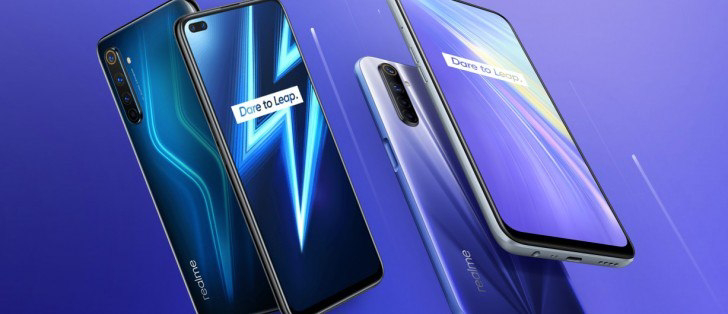
The Realme 6 came up on top by the narrowest of margins. One of the extras on the Realme 6 Pro is the 2x telephoto camera, the other is a Snapdragon 720G chipset built on a more power efficient process. PS. the Realme 6i was announced this week for those on the lookout for something even more affordable than the Realme 6.
Uncategorized

How to remove a Trojan, Virus, Worm, or other Malware from Windows, follow these steps

How to remove a Trojan, Virus, Worm, or other Malware from Windows, follow these steps 
STEP 1: Use Rkill to terminate suspicious programs
STEP 2: Use Malwarebytes to remove Trojans, Rootkits, or other Malware
STEP 3: Use HitmanPro to scan for Browser Hijackers and Adware
STEP 4: Use Zemana AntiMalware Free to remove Potentially Unwanted Programs
(OPTIONAL) STEP 5: Double-check for malicious programs with Emsisoft Emergency Kit
(OPTIONAL) STEP 6: Reset your browser to default settings
Uncategorized

Smartphone shipments drop by 37 million units in February YoY due to COVID-19

Smartphone shipments drop by 37 million units in February YoY due to COVID-19
Research firm Strategy Analytics released a report with the number of smartphone shipments for the month of February 2020, representing a sharp decline in the overall number of smartphones sold compared to February 2019. The majority of smartphone production happens in China, and with the outbreak of the COVID-19 virus, manufacturing in China slowed to a halt in January which disrupted supply chains to many industries around the world, not limited to consumer electronics. February 2020 saw the biggest fall ever in the history of the worldwide smartphone market.
Uncategorized

OnePlus shares unreleased marble 7T, more 6 color options

OnePlus shares unreleased marble 7T, more 6 color options

The OnePlus 7T launched last September came in two colors – Glacier Blue and Frosted Silver. OnePlus CEO Pete Lau took to Twitter to share pictures of the OnePlus 7T with a marble finish, which looks pretty cool and we really wish it came to the market. OnePlus is expected to unveil the OnePlus 8 and 8 Pro on April 15 and we hope they will come with some cool colors, materials, and finishing.
Uncategorized

Xiaomi Mi 10 lands in India on March 31

Xiaomi Mi 10 lands in India on March 31
The Xiaomi Mi 10 that was launched in China last month, and set to make a global debut on March 27, will arrive in India on March 31. Either Xiaomi will have another event for it later on or it will miss that market altogether. Xiaomi Mi 10 comes in Peach Gold, Green, and Black colors Fueling the entire package is a 4,780 mAh battery that draws power at up to 30W through wired and wireless chargers.
Uncategorized

Oppo shares the wrong Find X2 weight, offers refunds

Oppo shares the wrong Find X2 weight, offers refunds
Oppo\’s Vice President, Shen Yiren, addressed company\’s fans on Weibo and apologized for the mistake they\’ve made on Find X2\’s product page. It seems that the glass and ceramic versions of the Find X2, both have been listed with lower than actual weight on the product page. The glass Find X2 has been listed with a weight of 187g while it\’s actually 192g while the discrepancy between the actual and listed weight of the ceramic version is even higher – 196g versus 209g. The Find X2 Pro ceramic version was also listed with about 10 grams lower weight.