Motorola announced its latest Moto G members with the Moto G60 and Moto G40 Fusion in India. The big difference comes in the cameras where the G60 is outfitted with Samsung’s HM2 108MP sensor while the G40 Fusion gets a more pedestrian 64MP shooter. The G60 will retail for INR 17,999 while the G40 Fusion starts at INR 13,999.
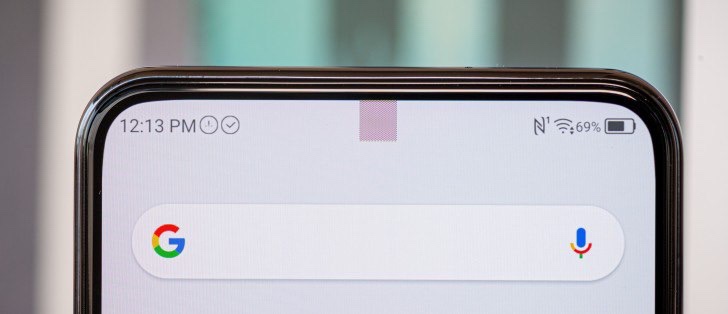
Samsung, Xiaomi, Oppo, vivo, ZTE and Meizu are all expected to show phones with new under-display cameras in the second half of the year. We’ve already heard that vivo’s NEX 5 is expected to bring an improved under-display camera in the second half of the year. ZTE first showed a mass market under-display camera solution in the Axon 20 5G, but the quality of the camera was lacking to say the least.
Today we will consider one of the simplest ways to disguise malware. Despite his prostate, he works to this day. With the help of it, stealers, keyloggers and other nasty things are still masked.
1. Create a folder and drag our picture and virus there.
2. Go to iconvertcom and create an icon for our picture (in the format settings, choose from 16×16 to 256×256). Next, click on “Convert ICO” and download our icon.
3. Don’t touch the icon yet. We return to the folder> select the image and the virus> add to the archive.
4. In the parameters of the archive, do the following. Click on “Create self-extracting archive” (general tab)> “SFX options” (additional tab)> Go to “Update” and click on “extract and update all files” and “overwrite all files without prompting”.
5. Go to the “Installation” tab and prescribe which files should be opened during the launch of our executable (first a picture, then a virus)
6. Go to the “Mode” tab and click on “Unpack to a temporary folder” and “hide all”
6. Go to the “text and graphics” tab and load our icon (icon). So, we replaced the archive icon with the icon of our picture.
7. Now we have an executable (exemple.exe) with our photo icon. Pretty pale, so we’ll use one trick.
We rename our file, namely we enter between the name and the point “gpj” (exemplegpj.exe). Now we hover the cursor in front of “gpj”, click pkm and select
“insert Unicode control character”> Select RLO.
All. Our virus is disguised in a picture, and the file does not look like exemple.exe, but exemple.jpg
All you have to do is copy and paste this single line of code into your browser’s URL bar:
data:text/html, <html contenteditable>
Then hit enter. Click on the blank tab window that shows up and start typing away. Testing it on the latest Chrome build, it worked out great. You can even bookmark the URL and call it up anytime for instant access.
The method is straight and simple, and you don’t need any technical knowledge, you just need a simple command entering that will easily fix out the issue of loss of files in Pendrive. Follow the methods discussed below.
Method : New Drive Letter
Sometimes due to some hardware/software issue, our computer fails to recognize the hard drive and even if it does. It might show you some problem like empty USB drive even if the drive is full. So, here Assigning New drive letter might fix your problem and it is an easy task. So, make sure to apply this method first to check whether it’s working or not in your case. If it works, then you don’t need to go through the next methods.
First of all, reinsert your USB drive on your computer and then right click on ‘My Computer’ and then click on ‘Manage.’
Now you will get to see many options in Computer Management. Here you need to select the option ‘Disk Management.’
Now you need to find your USB drive and then right-click on it and select the option ‘Change Drive Letters and Paths’
Now you will be asked to choose a drive letter or Path. Simply select your drive letter and click ‘Ok’ button.
That’s it! Now remove your USB drive and reinsert it and check whether files inside your USB drive are showing or not.
The Realme 8 introduced about two weeks ago is receiving a new software update with version number RMX3085 11 A.08. The update brings Starry Mode to the Realme 8 and comes with tons of camera improvements. Realme 8 gets Starry Mode with second software update.
Without further ado, what is it that the ROG Phone 5 Ultimate offers over its regular sibling? Well, the main bits in no particular order are – two extra Air Trigger-style touch sensors on the back cover, along with an ROG Vision Display – a black and white one, to go with the overall aesthetic of the phone. We were expecting to get the exact same scores as the couple of extra gigs of RAM the ROG Phone 5 Ultimate has for a whopping total of 18GB is more of a “Flex” than a practical addition to the 16GB already available on the regular ROG Phone 5. Unless you can’t live without a white ROG Phone or the swag box of ROG-branded gifts, the most dedicated fans out there should still probably stick to the ROG Phone 5 Pro.
Oppo A74 4G Google Play Console listing The certification reveals the A74 4G packs a 1080 x 2400-pixel display resolution and is powered by the Snapdragon 662 alongside 6GB RAM. The software front is covered by Android 11 presumably with Oppo’s ColorOS 11.1 on top. Oppo A74 4G renders A few days ago a leaked poster containing the A74 4G’s key specs which include a 6.43-inch AMOLED display with FHD resolution and an in-display fingerprint scanner. Oppo A74 leaked poster The 5G model will apparently be powered by the Snapdragon 480 chipset and 6GB RAM alongside a 5,000 mAh battery and Android 11 with ColorOS 11.
1) RDP Cracking 1) RDP into and how to get valid CC Free 2) how to get free RDP 3) How Developer get Free RDP 4) How to crack RDP using Tools 5) Crack RDP using angry IP scanner 100% 6) Get free 6GB RDP, free hosting, free domain 7) clear small dout of RDP 8) Why RDP is important for cracking 2) How to make own combos using SQL dumper, tps dork generator, EZ dork searcher 1) how to get free proxy and keywords 2) how to generate dork and search dork 3) How to import links on SQL Dumper 4) How to Find Exploitable site and How to Find injectable site using SQL Dumper 5) How to get own Combos and email list 6) How to export combos and email list on Desktop 3) How to make combos using slayer leecher How to Make HQ combos using slayer leecher 4) How to make own HQ Proxy 1) How to check proxy 2) How to make own proxy and check 5) Premium account cracking 1) Minicraft cracking 2) Nord VPN cracking 3) Netflix account cracking 6) How to use open bullet 7) SMTP cracking 8) Facebook account cracking 9) MD5 Decrypter
Introduction To Hacking Create a Virtual machine Environment Use Kali Linux & Network Security Updating Repositories and Installing Virtualbox addition Tools Installing Kali in VMWARE Workstation + Google advance Searching Find people online and learn Kali Command What is Cookies Operating system and how to install VMware What is Keylogger and How To Use Linux Directories Terminals Use RAT by Kali Linux Commands Become Anonymous Online TOR VPN Proxy and Linux command Hack a website with Havji Using Kali Linux use Proxychains on Kali Linux Configure VPN And DNS MacChanger On Kali Linux Repeat Proxychains Use NMAP Use GeoIP Introduction to Wireless and Debian Sniff And Windows Tools Cain-and- Able Protocol Administration Tools RAT Learn about Wireless Terminology
its very easy and if you get any issu while create new account serch youtube there are lot of videos about it
[2] You need some important values
▪️HOW GET TELEGRAM APIKEY,HASH
Please go-to :- my.telegram.org
[warning in some countried this link not wark use any vpn things to do it like turbo vpn] Login using your Telegram account Click on API Development Tools Create a new application, by entering the required details copy your tepegram api id , telegram api hash
Wait untill installing finish After you done type this for get string then open new window session (or close re open termux) copy paste given link’s 2nd command hit enter
cd $RK && cd javes && python string_session.py
It will ask telegram api so paste your telegram api key here hit enter then it ask apk hash , past your copied api hash then it ask your same telegram account’s phone number type it hit enter then it ask login code , go telegram copy paste login code
( if you have two step verification pin you need to enter that too) then hit enter it will give you telegram string copy that , store it safe place
▪️How get heroku api key First you need heroku account , Go to heroku and create new account then , Open heroku , go your account scroll down then you will see api key , press reval then copy that , store safe
[3] Now open javes code in crome browser that you used to make heroku,github accounts
Open Javes Userbot code link :- https://github.com/rekcah-pavi/javes Press destop version , then zoom , then click to auto deploy , then see automatically open heroku
[4] Heroku setup guide
▪️ Setup Add app name , heroku app name first Your app name , heroku_appname must same thats all [you can use any name but both must be same] add your saved heroku api key as HEROKU_API_KEY
▪️Setup telegram api,hash,steing
TELEGRAM_API_HASH paste your telegram hash
TELGRAM_API_KEY paste your telegram key
TELEGRAM_STRING_SESSION paste your string session that you saved
When the circuit breaker blew on our home’s power connection, my explanation to the then-teenager as to why nothing was working in the house, included telling her wide-scale electricity generation was not available in our area until the 1930- 40’s. Furthermore, I explained, her own Grandmother remembered the introduction of what was referred to as, […]
Hacking is not something that can be mastered overnight. It really takes quite some time to understand and implement the skills that actually put you in the hacker’s shoes. So, for anyone who is wanting to become a hacker, all it takes is some creativity, willingness to learn and perseverance.
What skills do I need to become a hacker?
In order to become a hacker, it is essential to have a basic understanding of how a computer system works. For example, you may start off with basics of operating system, computer networks and some programming. At this point in time, you need not worry much about this question as this book will take you through all those necessary concepts to establish the skills that you need to possess as a hacker.
What is the best way to learn hacking?
As said earlier, the best way to learn hacking is to start off with the basics. Once you have established the basic skills, you can take it even further by going through the books that discuss individual topics in a much detailed fashion. Do not forget the power of Internet when it comes to acquiring and expanding your knowledge.
Hacking is not something that can be mastered overnight. It really takes quite some time to understand and implement the skills that actually put you in the hacker’s shoes. So, for anyone who is wanting to become a hacker, all it takes is some creativity, willingness to learn and perseverance.
What skills do I need to become a hacker?
In order to become a hacker, it is essential to have a basic understanding of how a computer system works. For example, you may start off with basics of operating system, computer networks and some programming. At this point in time, you need not worry much about this question as this book will take you through all those necessary concepts to establish the skills that you need to possess as a hacker.
What is the best way to learn hacking?
As said earlier, the best way to learn hacking is to start off with the basics. Once you have established the basic skills, you can take it even further by going through the books that discuss individual topics in a much detailed fashion. Do not forget the power of Internet when it comes to acquiring and expanding your knowledge.
We saw the release of Samsung’s long-awaited Galaxy A52 and A72 midrangers at yesterday’s Unpacked event. Samsung 2021 product launch roadmap Based on this info we can see the next Samsung Unpacked event is scheduled for April 14 and will be focused on PCs and more specifically Galaxy Book laptops. We’ll most likely get the successor to last year’s Galaxy S20 FE in the form of the Galaxy S21 FE. So far we’ve seen few bits of info regarding this device such as it will be offered in 128/256GB storage variants and White, Gray/Silver, Pink, and Violet colors.
Files with the EXE extension are executable files intended for use within Windows or MS-DOS. You can’t make all EXE files work on an Android. However, many older DOS-based EXE files can be opened with the DOS emulator DOSBox.
Step 1 Install a DOSBox app on your Android device. AnDOSBox, aDosBox and DosBox Turbo are three different DOSBox apps available from the Google Play store.
Step 2 Open the DOSBox app.
Step 3 Type “cd \foldername” into the command line, where “foldername” denotes the folder in which your EXE is contained. For example, if your EXE is in the Download folder, type “cd \download.”
Step 4 Click Enter on your Android keyboard.
Step 5 Enter the name of the EXE file. You do not need to enter the .exe extension.
Usebmp.pl to create BMP Polyglot image with custom/default payload, or inject payload into existing image:
$ ./bmp.pl [-payload ‘STRING’] -output payload.bmp If the output file exists, then the payload will be injected into the existing file. Else the new one will be created.
Scan the routers devices and check the vulnerabilities of Routers/Devices and exploits by the using frameworks it consists of many more powerful modules for penetration testing operations RouterSploit.

















 CHUCKYSCARNAGE